Updated 2 October 2026
Lemon Squeezy analytics with revenue attribution
Lemon Squeezy takes the order. trckable tells you which visit, source and campaign it came from, and keeps crediting that visit for every renewal.
In short
- Paste one Lemon Squeezy API key (Settings → API). trckable creates the webhooks, live and test mode, and backfills 90 days.
- Checkout links need no code: the tracker adds the visitor to Lemon Squeezy links on click. Checkouts you create through the API take one extra field.
- A new subscription sends two events at Lemon Squeezy. trckable counts it once, and renewals follow the visit that started the subscription.
What you can and cannot see in Lemon Squeezy#
Lemon Squeezy is a merchant of record for digital products and subscriptions, and its dashboard is good at what it does: orders, customers, licence keys, payouts. It does not know which blog post, search or social post sent the customer.
That gap is the question every small software business ends up asking: where should the next hour go? trckable fills it. Each order and each renewal is credited to a visit, so your sources, pages and campaigns show visitors, conversion and revenue together.
How an order finds its visit#
Lemon Squeezy lets a checkout carry custom data, and trckable uses it to carry the visitor id.
- Checkout links on your page. When someone clicks a link to a Lemon Squeezy checkout, the tracker adds the visitor id as
checkout[custom][trckable_vid]. Nothing to configure. - Checkouts created with the API. Add the helper's
checkout_datawhen you create the checkout:
const ids = getIds(request.headers.get('cookie'))
await createCheckout(storeId, variantId, {
  checkoutData: checkoutFields('lemonsqueezy', ids).checkout_data,
})- Renewals. Once a customer is linked to a visit, every later payment of that subscription is credited to the same visit, not to whatever they did the day the card was charged.
An order without a visitor id still counts in your totals and shows as unattributed.
Connect Lemon Squeezy in three steps#
- Create an API key at app.lemonsqueezy.com/settings/api.
- Paste it in Settings → Payments → Lemon Squeezy. trckable connects the first store the key can see, creates a webhook for live events and another for test-mode events pointing at the same address, and stores the signing secret encrypted. Then it backfills the last 90 days.
- Check one test order. Make a test-mode purchase from a page you visited with the tracker on, and it appears as a test payment, kept out of your real numbers.
If your account has several stores, one-key setup uses the first. Another store can be added with the manual webhook setup.
Your server needs a public HTTPS address. A self-hosted trckable takes it from TRCKABLE_BASE_URL.
The Lemon Squeezy details trckable handles for you#
Lemon Squeezy's webhooks are simple, and simple has consequences. Each one is accounted for.
- A new subscription sends two events.
order_createdandsubscription_payment_successboth arrive for the first payment. Only the order counts, so the sale is not doubled. - Webhooks have no event id and no timestamp. trckable derives a key from the event, the object and its last update time, so a webhook Lemon Squeezy sends twice is one event.
- Refund amounts are cumulative per order. trckable does not sum a cumulative total twice, so a partial refund followed by another is not counted twice.
- Retries stop. Lemon Squeezy retries a failed webhook three times over about two and a half minutes, then gives up. Every six hours trckable asks the API for recent payments and refunds and fills in whatever never arrived.
What trckable listens for#
| Event | Used for |
|---|---|
order_created, order_refunded | One-time purchases and the first payment of a subscription, and their refunds |
subscription_created | Linking the subscription to the visit |
subscription_payment_success, subscription_payment_refunded | Renewals and their refunds |
What you see#
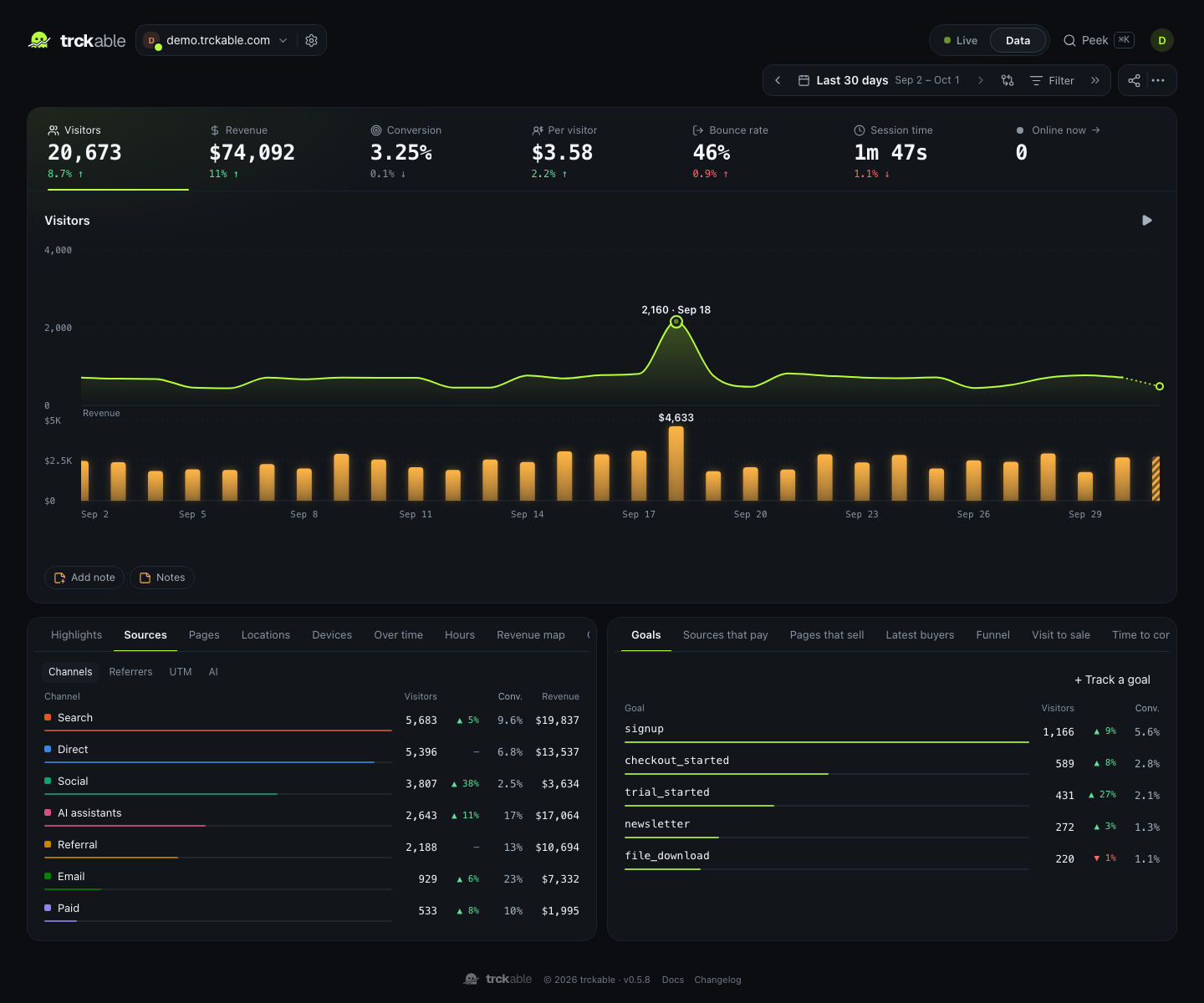
Revenue, conversion and revenue per visitor sit in the key numbers. Revenue plots under the visitors chart, every breakdown row gets revenue and conversion columns, and Sources that pay ranks your channels by revenue per visitor. In Full mode, Pages that sell and Latest buyers show what people read before they bought.
What counts as revenue#
- The amount paid excluding tax, before fees, converted to your site's currency at the European Central Bank's rate on the day of the payment.
- Refunds are subtracted per refund. Test-mode orders are kept apart from your real numbers, with a toggle to look at them.
- Attribution goes to the last non-direct visit within 90 days before the order, or the first touch if you switch the model. Totals never change, only the credit.
Questions#
- Do live and test orders both come through?
- Yes. The key creates a webhook for each mode, and test payments are labelled as test and excluded from your real numbers.
- Which store does trckable connect?
- The first store the API key can see. Others can be added with the manual webhook setup.
- Why does a new subscription not count twice?
- Lemon Squeezy sends an order event and a subscription-payment event for the first payment. trckable counts the order and ignores the matching first subscription payment.
- Do I need to change my buy buttons?
- If they are plain links to a Lemon Squeezy checkout, no: the tracker adds the visitor when the link is clicked. If you open the checkout through the API, add the
checkout_datafield. - What does a self-hosted trckable need?
- A public HTTPS address (
TRCKABLE_BASE_URL), so Lemon Squeezy can reach the webhook. Every feature is in the self-hosted program.