Updated 2 October 2026
Stripe revenue attribution
Stripe knows what was paid. Your analytics know who visited. trckable joins the two, so every Stripe payment shows the source, campaign and page of the visit that earned it.
In short
- Paste one restricted Stripe key. trckable creates the webhook endpoint itself, pulls the last 90 days, and checks Stripe's API again every six hours.
- Payment Links need no code. The tracker adds the visitor to the link when it is clicked. Checkouts your server creates take two lines.
- Revenue means amount paid, excluding tax, before fees, with refunds and disputes counted. Test-mode payments stay out of your numbers.
The problem with Stripe on its own#
Stripe's dashboard answers "how much came in". It cannot say that the customer who paid $49 on Thursday first read your pricing page on Monday, after clicking a link in a newsletter. That context lives in your analytics, on the other side of a checkout page you do not control.
Without a link between the two, revenue is a total with no cause. You can see that a month was good, but not whether it was search, a launch post or a partner. trckable keeps the visit and the payment in one place and connects them, so each source in your reports shows visitors, conversion and money side by side.
How a Stripe payment finds its visit#
The link is a visitor id: a random value trckable's tracker keeps in a first-party cookie. It has to reach Stripe along with the checkout, and there are three ways it does.
- Payment Links. When someone clicks a
buy.stripe.comlink on your site, the tracker adds the visitor id to the link asclient_reference_id. You change nothing. - Checkout Sessions you create on your server. Pass the visitor through with the helper in the npm package:
import { getIds, checkoutFields } from 'trckable/server'

const ids = getIds(request.headers.get('cookie'))
await stripe.checkout.sessions.create({
  ...params,
  ...checkoutFields('stripe', ids, 'subscription'), // or 'payment'
})- The customer. Once a Stripe customer is linked to a visit, their later payments follow it. A renewal is credited to the visit that started the subscription, not to whatever the customer happened to be doing on the day the card was charged.
A payment that arrives with no visitor id still counts in your revenue totals. It is shown as unattributed rather than guessed.
Connect Stripe in three steps#
- Create a restricted key at dashboard.stripe.com/apikeys. Give it write access to Webhook Endpoints and read access to Events, PaymentIntents, Checkout Sessions, Invoices, Refunds and Disputes. Nothing else is needed: the key is not given permission to create charges or refunds.
- Paste it in Settings → Payments → Stripe. trckable creates the webhook endpoint with a fixed event list and a pinned API version, so a later change in Stripe's payload shape cannot surprise it. The signing secret is stored encrypted.
- Pass the visitor to checkout if you create Checkout Sessions yourself (the snippet above). Payment Links already work.
If you would rather not hand over a key, choose the manual setup: trckable shows you the endpoint URL and the events to select, and you paste the signing secret back.
Your server must be reachable from Stripe at its public HTTPS address. Self-hosting? Set TRCKABLE_BASE_URL to it, and the Payments page will say if it still points at localhost.
What trckable listens for#
The webhook subscribes to payment, checkout, invoice, refund and dispute events:
| Events | What they are used for |
|---|---|
payment_intent.succeeded | The payment itself: amount, currency, customer, visitor |
checkout.session.completed, checkout.session.async_payment_succeeded | Hints from Checkout: tax, the visitor, the subscription. Delayed payment methods count when they succeed |
invoice.paid, invoice_payment.paid | Subscription invoices, so renewals are recognised |
charge.refunded, refund.created, refund.updated, refund.failed | Refunds, recorded per refund id |
charge.dispute.created, charge.dispute.updated, charge.dispute.closed | Disputes: opened, won or lost |
The money is the PaymentIntent, which covers Checkout, Payment Links, Elements and invoices alike. Everything else only adds context.
What you see#
Once payments flow, revenue sits beside traffic everywhere: in the key numbers (revenue, conversion, revenue per visitor), as a plot under the visitors chart, and as columns on every breakdown row. Sources that pay ranks channels by revenue per visitor, and in Full mode Pages that sell and Latest buyers show where money was made and by whom.
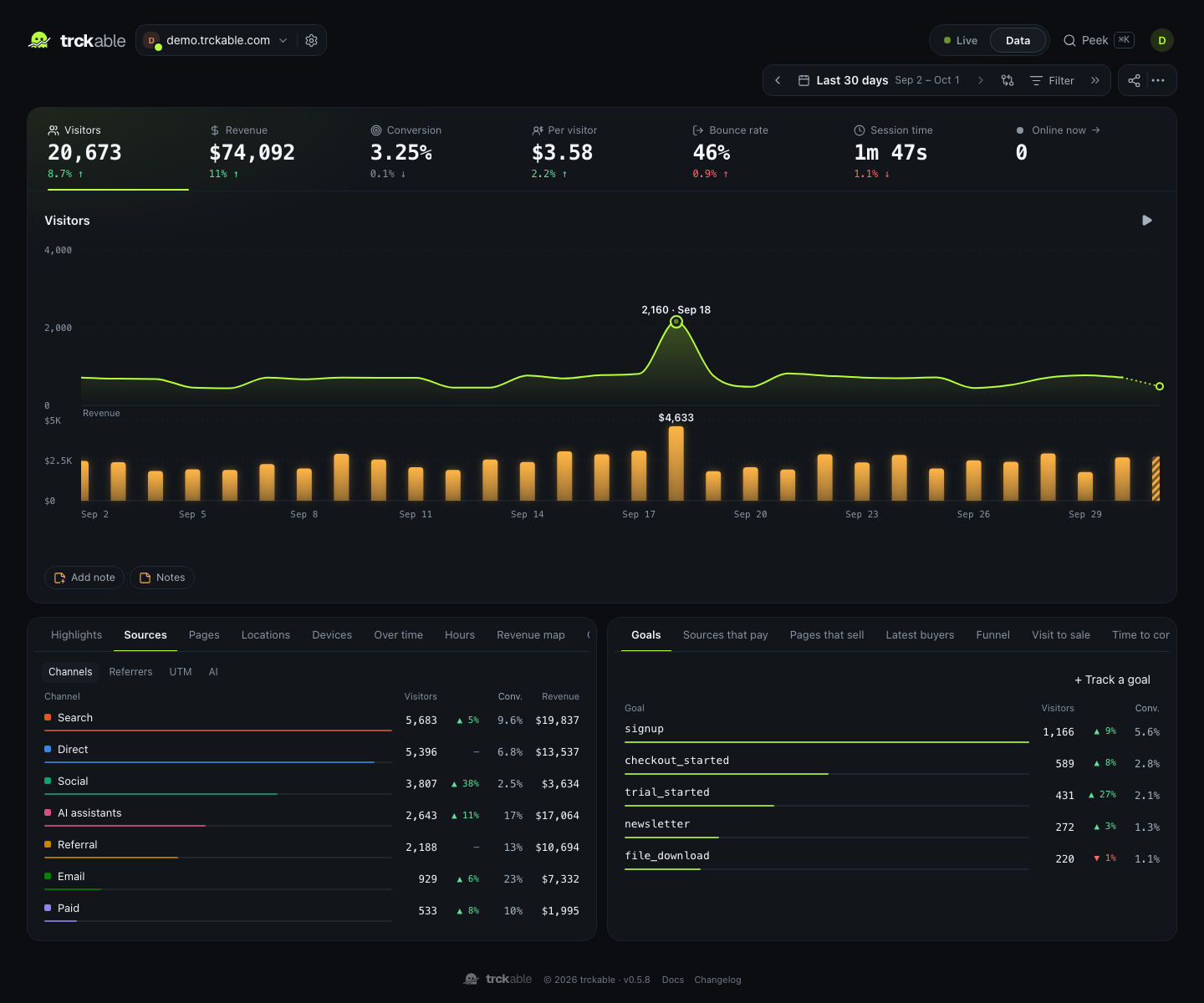
Hover a source and the money trail highlights where those visitors went and what they paid.
What counts as revenue#
- Amount paid, excluding tax, before Stripe's fees, converted to your site's currency at the European Central Bank's rate on the day of the payment.
- Refunds are subtracted, one per refund id, so a partial refund followed by another is not counted twice. Disputes are recorded as opened, won or lost.
- Test-mode payments are kept apart and stay out of your real numbers. A toggle shows them.
- Attribution goes to the last non-direct visit within 90 days before the sale. A switch moves the credit to the first touch instead. It changes who gets the credit, never the total.
Attribution is worked out when you look at a report, not when the payment arrives. A refund that reaches trckable before its payment, or a webhook Stripe sends twice or out of order, still ends up right.
When a webhook is lost#
Webhooks get lost: a deploy, a network blip, a server that was down. Every webhook trckable receives is written to disk before it answers Stripe. And every six hours it asks Stripe's API for recent payments, refunds and disputes and fills in anything missing through the same path. A dropped webhook is a delay, not a hole.
Questions#
- Does my revenue match Stripe's dashboard to the cent?
- Not necessarily, and it is not meant to. trckable shows revenue excluding tax and before fees, converted at the ECB rate on the day of payment, with refunds and disputes taken out. Stripe's own reports are built on their own definitions. We say "reconciled with Stripe", not "identical".
- Do I need to change my checkout code?
- For Payment Links, no. For Checkout Sessions you create, add the two lines above so the visitor id travels with the session. Without it, the sale is still counted but shows as unattributed.
- Can trckable move money or see card numbers?
- No. The restricted key reads payments, refunds and disputes and manages one webhook endpoint. It has no permission to create charges or refunds.
- What happens to my customers' emails and names?
- Stripe's raw notices contain them, so trckable keeps them for a limited time on your server. After 30 days (adjustable) the body is emptied, and the ledger keeps only the amount, the date, the ids and a keyed hash of the email. See privacy in the docs.
- Does it work on the self-hosted version?
- Yes. The self-hosted program is the same one that runs trckable Cloud, with every feature.
Keep reading#
- Revenue attribution for every provider
- The full revenue docs: reconciliation, refunds and the custom webhook
- Paddle, Lemon Squeezy, Polar, Dodo Payments
- trckable vs Plausible and vs DataFast: how revenue attribution compares