Updated 2 October 2026
Revenue attribution for your payment provider
Connect Stripe, Paddle, Lemon Squeezy, Polar or Dodo Payments with one key, and every sale is credited to the visit that earned it, renewals included.
In short
- Five providers, one key each. trckable creates the webhook, backfills 90 days and checks the provider's API every six hours. Any other checkout works through a signed webhook.
- Each sale is credited to the last non-direct visit within 90 days, or to the first touch if you switch the model. Renewals follow the visit that started the subscription.
- Revenue is the amount paid excluding tax, before fees, with refunds and disputes counted. Test payments stay out of your real numbers.
Pick your provider#
- StripePayment Links, Checkout, invoices and subscriptions, with one restricted key.
- PaddlePaddle Billing, live and sandbox, with the visitor passed from Paddle.js.
- Lemon SqueezyOrders and subscription renewals, with checkout links that carry the visit.
- PolarOrders and refunds from your organization, renewals following the first visit.
- Dodo PaymentsPayments, refunds and disputes, test and live kept apart.
Which source makes money?#
Traffic numbers say who came. Revenue says who paid. The two can disagree: the source with the most visitors is not always the one with the most customers, and a small channel can quietly pay for the rest.
Most analytics tools stop at counting a conversion. Some let you send an amount from your own code, which works until a refund, a renewal or a retried webhook makes the number drift. trckable takes the other route: it reads the payment provider's own signed webhooks and its API, keeps its own ledger, and connects each payment to a visit.
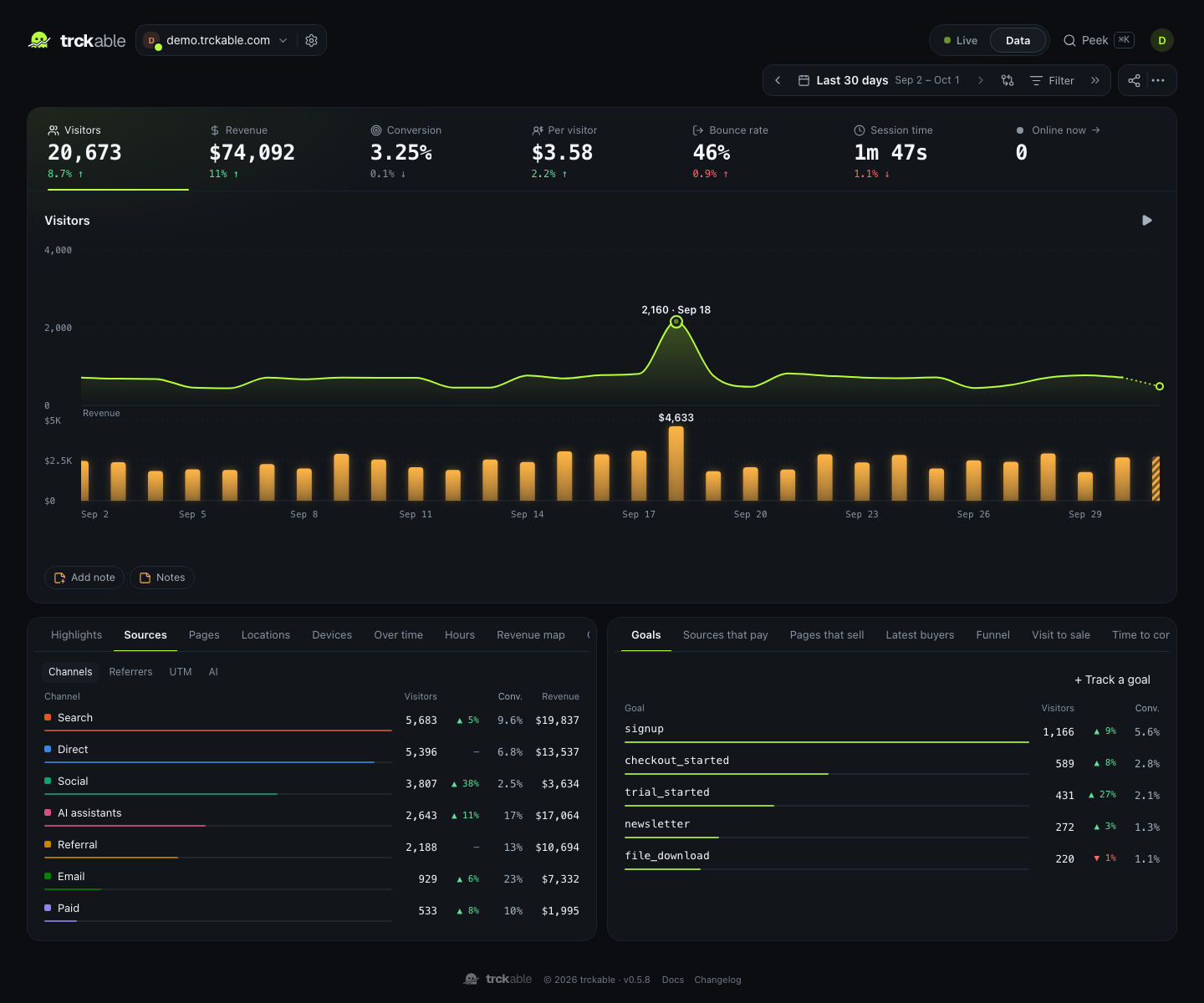
Then revenue sits wherever traffic does: in the key numbers, as a plot of its own under the visitors chart, as columns on every breakdown row, and in Sources that pay, which ranks channels by revenue per visitor.
How attribution works#
A visitor gets a random id, kept in one first-party cookie. The id has to reach the payment, and there are three ways it does, in order of preference:
- Checkout metadata. The tracker adds the visitor id to hosted checkout links when they are clicked: Stripe Payment Links and the checkout links of Lemon Squeezy, Polar and Dodo need no code.
- Checkouts your server creates. Pass the visitor through with one helper from the npm package. Paddle, which checks out in the browser, takes it as custom data in Paddle.js.
- The customer. Once a customer is linked to a visit, their renewals follow that visit.
A sale is credited to the visitor's last non-direct visit within the 90 days before it, because a direct visit says nothing about how they found you. A renewal belongs to the visit that started the subscription, not to whatever the customer was doing on the day the card was charged. A switch in the dashboard moves the credit to the first touch instead: the visit that found them, not the one that closed. It changes who gets credit, never the total.
A payment with no visitor id still counts in your revenue totals. It shows as unattributed, never guessed.
What counts as revenue#
Revenue here means the amount paid, excluding tax, before the provider's fees, converted to your site's currency at the European Central Bank's rate on the day of the payment.
| How it is counted | |
|---|---|
| Refunds | Subtracted, one per refund id, so two partial refunds are not counted twice |
| Disputes | Recorded as opened, won or lost; a lost dispute is subtracted |
| Test and sandbox payments | Kept apart from your real numbers, with a toggle to look at them |
| Renewals | Credited to the visit that started the subscription |
| Tax | Never part of revenue |
Attribution is worked out when you open a report, not when the payment arrives. A refund that reaches trckable before its payment, or a webhook sent twice or out of order, still ends up right.
A ledger that can be rebuilt#
Webhooks get lost: a deploy, a short outage, a provider that gives up after a few retries. trckable writes each webhook to disk before it answers, so a payment it acknowledged is never lost, and every six hours it asks each provider's API for recent payments and fills in what is missing through the same path. A dropped webhook is a delay, not a hole.
Because every webhook is stored raw, the ledger can be rebuilt from them. Raw notices contain your customers' emails and names, so they are emptied after 30 days by default (adjustable); what the ledger keeps is the amount, the date, the ids and a keyed hash of the email. The privacy docs say exactly what is kept.
A different checkout?#
Gumroad, Chargebee, Creem, a bank transfer you record by hand: anything that can make an HTTP request can report a sale. Settings → Payments → Anything else gives you a webhook URL and a signing secret, and your own code posts each sale to it with its amount, tax, currency, kind and the visitor id. The format is in the revenue docs.
Questions#
- Which payment providers does trckable support?
- Stripe, Paddle (Paddle Billing), Lemon Squeezy, Polar and Dodo Payments with one key each, plus any other checkout through a signed webhook.
- Does it work if I self-host?
- Yes. The self-hosted program is the same one that runs trckable Cloud, with every feature. Your server needs a public HTTPS address so providers can reach its webhook (
TRCKABLE_BASE_URL). - Is revenue attribution a paid add-on?
- No. Revenue is part of trckable on every plan and in the self-hosted program.
- Will the numbers match my provider's dashboard?
- They are reconciled with it, not identical: trckable's revenue excludes tax, is before fees, is converted at the ECB rate and takes refunds and lost disputes out. Your provider's reports use their own definitions.
- How does this compare with other analytics tools?
- Some tools take an amount sent from your own code, some need a paid plan for revenue, and some offer none. Each comparison page lists what the other tool says, with sources: trckable vs Plausible, vs DataFast, vs Umami and all comparisons.
Keep reading#
- The full revenue docs: reconciliation, refunds, the custom webhook, the CLI
- Analytics for SaaS and for indie hackers
- Accuracy: how we test that the numbers are right