Updated 2 October 2026
Paddle revenue attribution
Paddle collects the money and handles the tax. trckable adds the missing piece: which visit, source and campaign each transaction came from.
In short
- Connect Paddle Billing with one API key. Live and sandbox keys are told apart by their prefix, and trckable creates the notification setting itself.
- Paddle checks out in the browser, so the visitor id goes into Paddle.js as custom data. That is the one line you add.
- Revenue is the transaction amount excluding tax. Adjustments (refunds, credits, chargebacks) are subtracted once Paddle approves them.
What Paddle does not tell you#
As merchant of record, Paddle shows you transactions, customers, tax and payouts. It does not know that the customer arrived from a search for "self-hosted analytics", read three pages, left, and came back from a newsletter a week later. That story is in your analytics.
trckable connects the two. Each Paddle transaction is credited to a visit, and revenue appears next to traffic in the reports you already use: per source, per campaign, per page, per country. If you sell with Paddle because it takes tax off your plate, this is the part that tells you what to spend your attention on.
This page is about connecting your Paddle account to your own analytics. (trckable Cloud itself bills its customers through Paddle, which is a separate matter.)
How a Paddle transaction finds its visit#
Paddle's checkout is opened from your own page with Paddle.js, and the tracker does not add anything to it. You pass the visitor id yourself, as custom data, when you open the checkout:
// Paddle.js, in the browser: read the trckable_vid cookie
Paddle.Checkout.open({
  items,
  customData: { trckable_vid: document.cookie.match(/trckable_vid=([^;]+)/)?.[1] },
})
If you create transactions on your server, the npm package has the same helper as for the other providers: checkoutFields('paddle', ids) returns { custom_data: { trckable_vid } }.
From there, the customer graph does the rest. Once a Paddle customer is linked to a visit, their renewals follow that visit, and a subscription's later transactions are credited to the visit that started it.
A transaction with no visitor id still counts in your totals and shows as unattributed.
Connect Paddle in three steps#
- Create an API key at vendors.paddle.com/authentication-v2 with these permissions:
notification_setting.write,transaction.readandadjustment.read. Live keys start withpdl_live_, sandbox keys withpdl_sdbx_. - Paste it in Settings → Payments → Paddle. trckable creates the notification setting that sends transaction and adjustment events to your server, and stores the signing secret encrypted. It then backfills the last 90 days.
- Add the visitor to your checkout with the snippet above.
No key? Choose the manual setup: trckable gives you the destination URL and the event names, and you paste the secret back.
Your server needs a public HTTPS address Paddle can reach. For a self-hosted trckable, set TRCKABLE_BASE_URL to it.
Live and sandbox#
Paddle's payloads do not say whether they came from the sandbox or from live. trckable knows from the key: a pdl_sdbx_ key makes a sandbox connection, and its transactions are kept apart from your real numbers. There is a toggle in the dashboard to look at them. That makes the sandbox a safe place to test the whole chain, from a visit through checkout to the report, before any real customer pays.
What trckable listens for#
| Event | Meaning |
|---|---|
transaction.completed, transaction.paid | A transaction that took money. This is the payment |
adjustment.created, adjustment.updated | Refunds, credits and chargebacks. Only approved adjustments move money |
Paddle sends amounts as integer strings in the lowest unit of the currency, and trckable reads them that way. The same transaction arriving twice is one payment, and events may arrive in any order.
What you see#
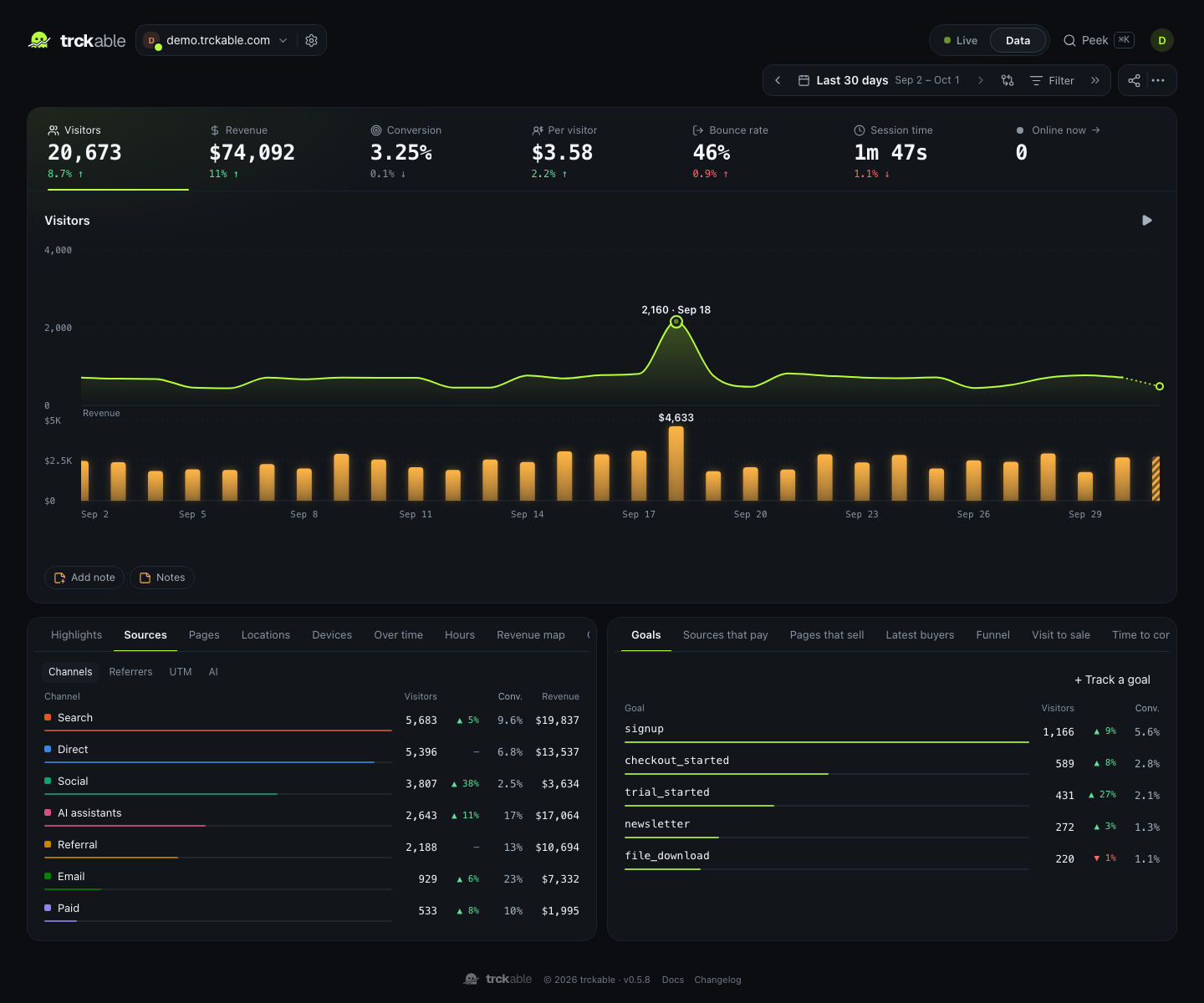
Revenue, conversion and revenue per visitor sit in the key numbers. A revenue plot runs under the visitors chart with its own axis, every breakdown row has revenue and conversion columns, and Sources that pay ranks channels by revenue per visitor. In Full mode, Pages that sell shows which pages visitors read before they bought, and Latest buyers lists recent purchases.
What counts as revenue#
- The amount paid excluding tax, converted to your site's currency at the European Central Bank's rate on the day of the payment, and before Paddle's fees.
- Refunds and chargebacks are subtracted when Paddle approves the adjustment.
- Attribution goes to the last non-direct visit within 90 days before the sale, or to the first touch if you switch the model. The total never changes, only who gets the credit.
If a notification is missed#
trckable stores each notification on disk before it answers. Every six hours it also lists recent transactions and adjustments through Paddle's API and fills in anything missing, so a missed notification is a delay and not a gap.
Questions#
- Is this Paddle Billing or Paddle Classic?
- Paddle Billing, the current API: transactions, adjustments and notification settings.
- Why do I have to pass the visitor myself?
- Paddle checkouts are opened by your own code with Paddle.js, which accepts custom data. That is where the visitor id goes: one property, read from the
trckable_vidcookie. - Does the tracker add the visitor to Paddle checkouts by itself?
- No. It decorates hosted checkout links for Stripe, Lemon Squeezy, Polar and Dodo only. For Paddle, use the custom data route above.
- Will my revenue match Paddle's dashboard?
- Close, but trckable shows amounts excluding tax, before fees and converted at the ECB rate, with approved adjustments taken out. Paddle's own reports use their definitions. We say "reconciled with Paddle", not "identical".
- What about my customers' personal data?
- Paddle's raw notices include emails and names. trckable keeps them on your server for 30 days by default, then empties the body and keeps the amount, date, ids and a keyed hash of the email.
Keep reading#
- Revenue attribution for every provider
- The full revenue docs
- Stripe, Lemon Squeezy, Polar, Dodo Payments
- Analytics for SaaS: MRR by source and the goals worth tracking