Updated 2 October 2026
Analytics for SaaS
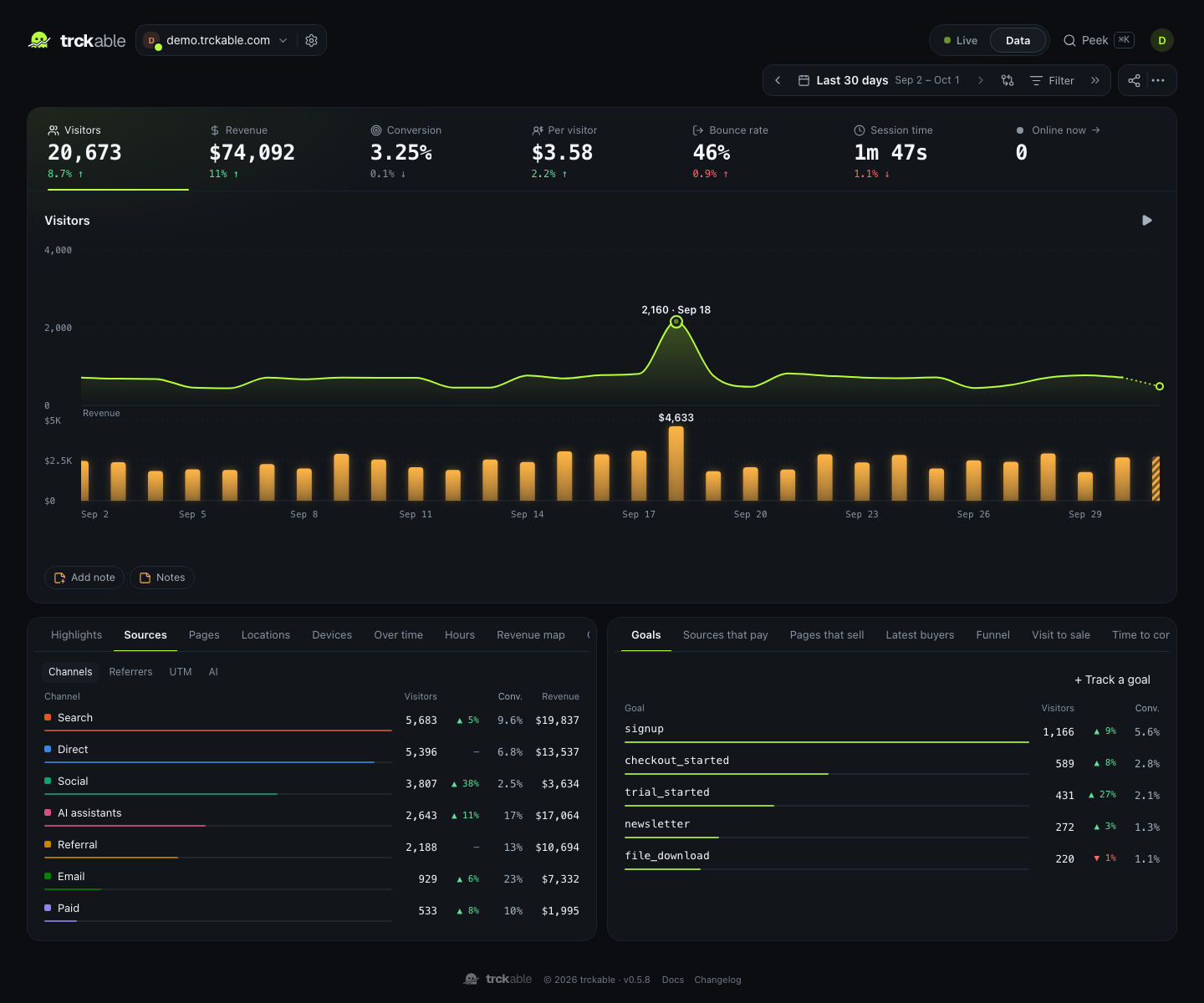
A SaaS lives or dies on the path from a first visit to a paying subscription. trckable follows that path and shows which source, page and campaign each customer took.
In short
- Follow the whole path: visit, signup, trial, payment. Goals and funnels show where people stop; revenue shows who paid.
- Credit the source that won the customer, and keep crediting it for every renewal, with a switch between last touch and first touch.
- Privacy-friendly by design: no IP address stored, a cookieless mode, and nothing loaded from another company.
The jobs a SaaS asks of analytics#
Product analytics tools answer what users do inside the app. Web analytics answers the part before it: who arrives, from where, and what makes them sign up. For a SaaS you want the second, tied to the first payment and the ones after it.
- Which channels bring signups? Search, social, email, paid, referrals and AI assistants are separate channels, so a visit from ChatGPT is not buried in Direct.
- Which pages convince? The pages people read before signing up are in Pages that sell, not just the pages with the most views.
- Which source brings customers who stay? Revenue is credited to the visit that started the subscription, and renewals follow it. A channel that brings a customer who pays for two years gets credit for two years.
- Where does the funnel leak? A funnel of pricing, signup, trial and payment shows the step where visitors stop.
From visit to subscription#
Here is a customer's path in trckable.
- They arrive from a source, which becomes their entry channel and campaign for that visit.
- They read pages, and reach goals you defined:
/pricing, a signup, a trial started. A page can be a goal with no code. - They pay through Stripe, Paddle, Lemon Squeezy, Polar or Dodo. The payment carries the visitor id, so the sale is credited to a visit.
- They renew. The renewal belongs to the visit that started the subscription, not to what they were doing on the day the card was charged.
A sale is credited to the visitor's last non-direct visit within 90 days, or to the first touch if you flip the switch. The total revenue never changes with the model; only the credit does. That is the honest way to put the two views next to each other.
Set it up#
- Add the tracker.
npm i trckablefor React or Next.js, or a script tag anywhere. For a marketing site on one domain and an app on a subdomain, use the same site id anddata-domainon both, so one visitor is one visitor across them. - Define the goals that matter: a signup, a trial started, a demo requested. Page goals need no code. Properties such as a plan can ride along:
track('signup', { plan: 'pro' }). - Connect your payment provider with one key: Stripe, Paddle, Lemon Squeezy, Polar or Dodo Payments. When your server creates the checkout, pass the visitor with one helper so the sale knows which visit it came from.
What the reports show#
- Sources that pay ranks channels by revenue per visitor, with the change in revenue on each row.
- Pages that sell and Latest buyers (in Full mode) show what people read before they paid, and who paid recently.
- Funnel, Visit to sale and Time to convert show where visitors stop, and how long a sale takes.
- Retention cohorts show whether returning visitors come back.
- The revenue chart's hover card splits each day's revenue into new and renewal amounts.
Revenue is the amount paid excluding tax and before fees, with refunds and lost disputes taken out, so the number is the one you would actually report.
Working with a team#
- Viewer roles let teammates read the numbers without changing anything: all sites, or only the ones you pick.
- Public share links show a report to someone without an account, with the revenue hidden on the server when you ask. They can have a password and an end date.
- Read-only API keys and an MCP server let your own tools and assistants read the numbers. On Cloud, Peek answers questions in plain words.
Privacy your customers can read#
trckable stores no IP address, loads no fonts, scripts or pixels from other companies, and offers a cookieless mode that stores nothing in the browser. The software is open source, so a customer's security team can read what it does. Cloud keeps data in the EU, and publishes a data processing agreement and a security page.
Whether you need a consent banner depends on your visitors' countries and your setup. The guide to cookieless analytics sets out the options, with the caveat that it is guidance and not legal advice.
Questions#
- Does it replace product analytics?
- No. trckable is web analytics with revenue. It does not record what users click inside the app, session replays of your product, or feature flags. Use a product analytics tool for that, and trckable for acquisition and revenue.
- Can I see MRR?
- trckable shows revenue by source and by day, split into new and renewal amounts, and credits each renewal to the visit that started the subscription. It does not present a separate MRR figure.
- How are trials handled?
- A trial that never pays has no payment, so no revenue. When the first payment arrives, it is credited like any other sale: to the visitor's last non-direct visit within 90 days, or to the first touch if you switched the model, provided the visitor id was passed through checkout. A goal such as "trial started" lets you count trials separately from payments.
- Can I keep my data on my own server?
- Yes. The self-hosted program is the same one that runs trckable Cloud, with every feature included, and the server is licensed under AGPL-3.0.
- Can I move my history in?
- trckable imports from Plausible, Umami and Google Analytics 4. See migrating.
Keep reading#
- Revenue attribution and the page for your provider
- Analytics for Next.js and for indie hackers
- trckable vs Google Analytics 4 and vs Plausible