In trckable a custom event is a goal: a named thing that happened, such as signup or newsletter. There are four ways to count one, and the quickest needs nothing on your site.
Open Track a goal
On Data, find the What they did card, open its Goals tab and click + Track a goal. The dialog offers four ways to count: Page visit, Button or link, Your code and Your server.
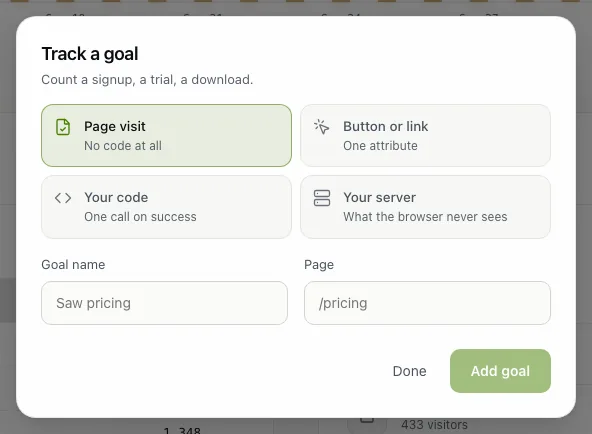
Count a page visit, with no code
Choose Page visit, give the goal a name such as Saw pricing and a page such as /pricing, then Add goal. A path ending in * covers everything under it, like /blog/*. The goal is counted from the pageviews trckable already has, so it shows the past too.
Or count a button, a link or a call
Button or link. Put one attribute on the element. Extra data-trckable-* attributes become properties:
<button data-trckable-goal="signup" data-trckable-goal-plan="pro">Start free trial</button>Your code. Call it when the action succeeded, not on the click. With the script tag:
trckable('goal', 'signup', { plan: 'pro' })With the npm package:
import { track } from 'trckable'

track('signup', { plan: 'pro' })
Your server. For things the browser never sees, post the goal yourself and send the visitor id from the trckable_vid cookie:
curl -X POST https://cloud.trckable.com/api/e \
  -H 'content-type: application/json' \
  -d '{"s":"tkb_a1b2c3d4","u":"https://example.com/welcome",
       "e":"goal","n":"signup","p":{"plan":"pro"},
       "id":"<visitor id from the cookie>","pv":"<pageview id>"}'
Tip. Use short, stable names (signup, trial_started) and never put a name, an email address or a user id in a property: trckable stores exactly what you send.
See the conversions
Each goal in the Goals tab shows how many visitors reached it and the share of all visitors, and From visit to goal underneath compares all visitors, the visitors who engaged and those who reached the goal.
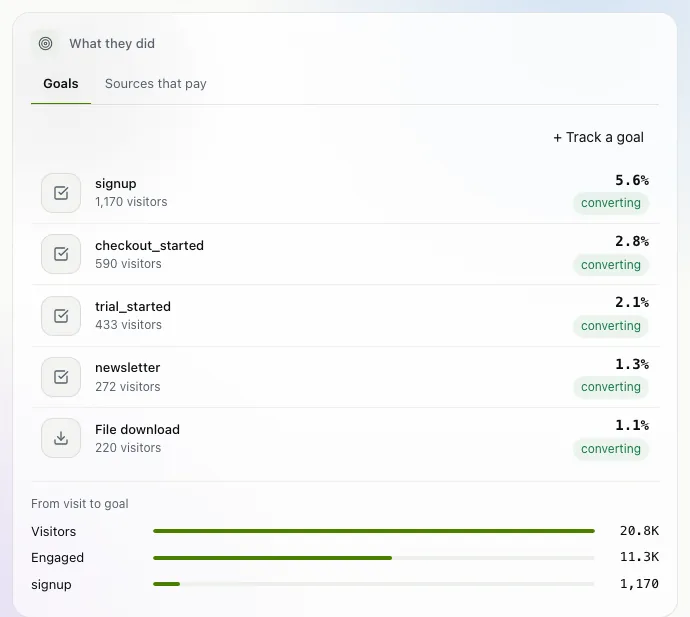
Click a goal and the whole dashboard narrows to the visitors who reached it: look at Sources, Pages or Locations to see where those people came from. Filter → Goal does the same from the toolbar. With payments connected, the next tab, Sources that pay, shows which sources earn the money (see track revenue).
The newsletter
Notes on measuring what matters.
Occasional emails from Albi: new posts, one chart worth reading, what changed in trckable.
We send one email to confirm your address, and nothing more until you confirm. Every newsletter has a link to leave. What we keep, and who sends it: privacy.