Connect your provider
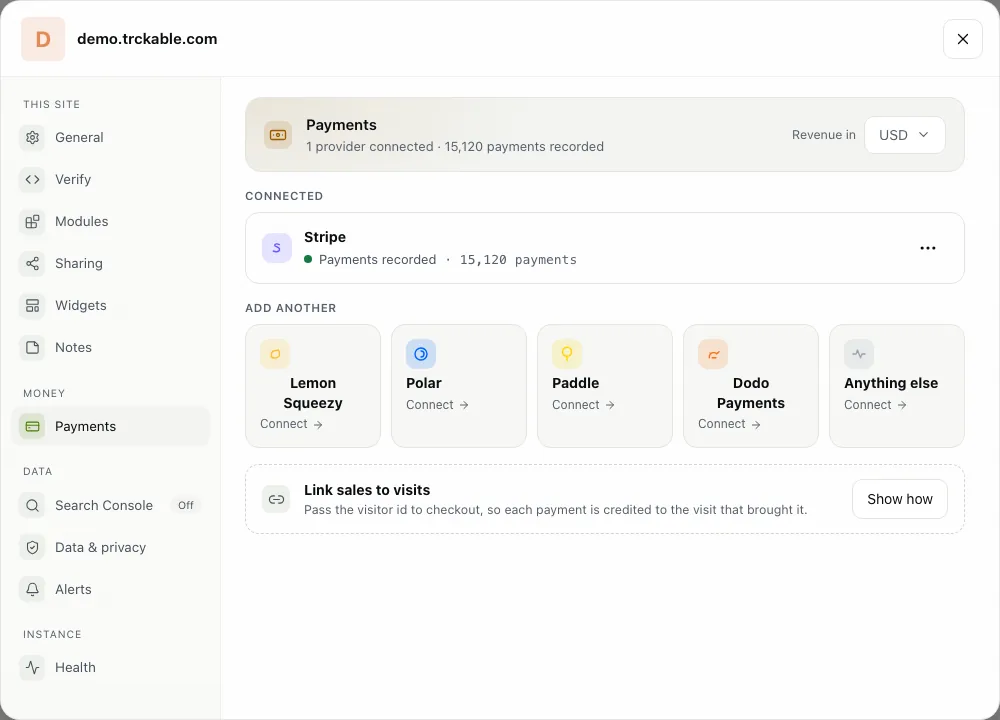
Open Settings → Payments. It lists the providers you can connect: Stripe, Lemon Squeezy, Polar, Paddle, Dodo Payments, and Anything else for any other checkout. Click Connect on yours.
The dialog asks for one thing: Paste a restricted API key, with a Where to find it link. A restricted key has only the access trckable needs: read, plus webhook endpoints. trckable then creates the webhook itself, so every sale, renewals included, reaches the dashboard. If you would rather not hand over a key, choose I'll add the webhook myself.
Step by step for each provider: Stripe, Paddle, Lemon Squeezy, Polar and Dodo Payments.
Link sales to visits
A sale only counts toward a channel when trckable knows which visit led to it. Under Link sales to visits, Show how opens a dialog, Attribute each sale, with a tab for each provider. In short:
- Payment Links and hosted checkouts from Stripe, Lemon Squeezy, Polar and Dodo need nothing: the script adds the visitor id to the link when it is clicked.
- A checkout your server creates passes the visitor on. With Stripe, that is two lines with the
trckable/serverpackage:
import { getIds, checkoutFields } from 'trckable/server'

const ids = getIds(request.headers.get('cookie'))
await stripe.checkout.sessions.create({ ...params, ...checkoutFields('stripe', ids, 'subscription') })- Paddle runs in the browser: pass the value of the
trckable_vidcookie ascustomData: { trckable_vid }toPaddle.Checkout.open.
A renewal is credited to the visit that started the subscription, not to whatever the customer was doing on the day the card was charged.
See revenue by channel
Back on Data, revenue appears in the key numbers (Revenue, Conversion, Per visitor) and as bars under the visitors chart. Revenue is the amount paid without tax, before fees.
For the split by source, open the What they did card and choose Sources that pay. Each row shows Customers, Per visitor and Revenue. Switch between Channel, Referrer, Campaign and Page to cut it another way.
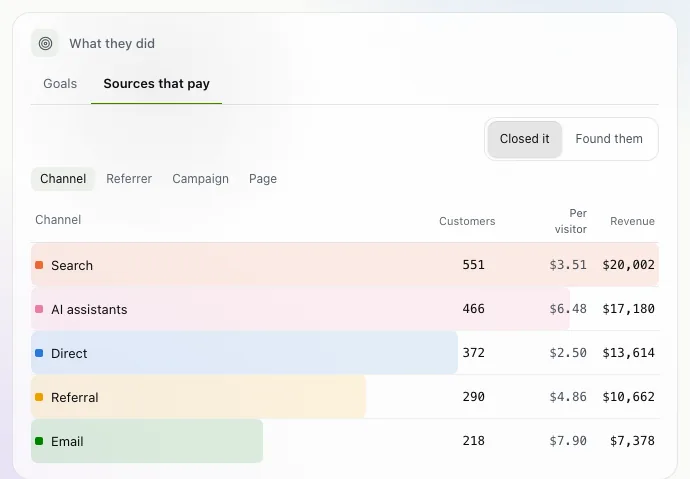
The switch at the top of the card sets who gets the credit. Closed it gives a sale to the last visit before it. Found them gives it to the visit that first brought the customer. It changes who gets the credit, never the total.
Tip. Hover a source anywhere in Who came and the pages those visitors saw and what they paid light up.
The newsletter
Notes on measuring what matters.
Occasional emails from Albi: new posts, one chart worth reading, what changed in trckable.
We send one email to confirm your address, and nothing more until you confirm. Every newsletter has a link to leave. What we keep, and who sends it: privacy.