Analytics usually learns that a site was down the next morning, as a hole in the chart. trckable also looks at your site itself, so a failing site is never reported as "fine".
Know what is checked
Every 5 minutes the server loads your site's homepage once: one plain request, no scripts, nothing from your visitors. Two failed looks in a row open a Down incident. One good look closes it and says how long the site was down.
The cause is in plain words, for example "Your homepage answered 503" or "No answer within 10 seconds". A server error (5xx, including Cloudflare's 520 to 526), no answer, a failed lookup or handshake, a timeout, and a 404 or other client error all count as down. A homepage behind a login (401 or 407) counts as answering, because the server did answer.
The check only calls a plain domain. An address with a port, a login, ? or # is refused when you add the site, with a message that says to use just the domain.
See it everywhere
A site that is not answering is shown everywhere you would look:
- Sites lists it under Needs attention with a red dot and "Not answering since 10:42", and its headline leads with that instead of "look fine";
- every page of the site carries a red bar with the cause and a link to the incident;
- the Live switch shows a red dot;
- Why? on the red bar in Live says what stopped answering and what to do, and the Uptime & incidents page lists each incident with what our checks saw.

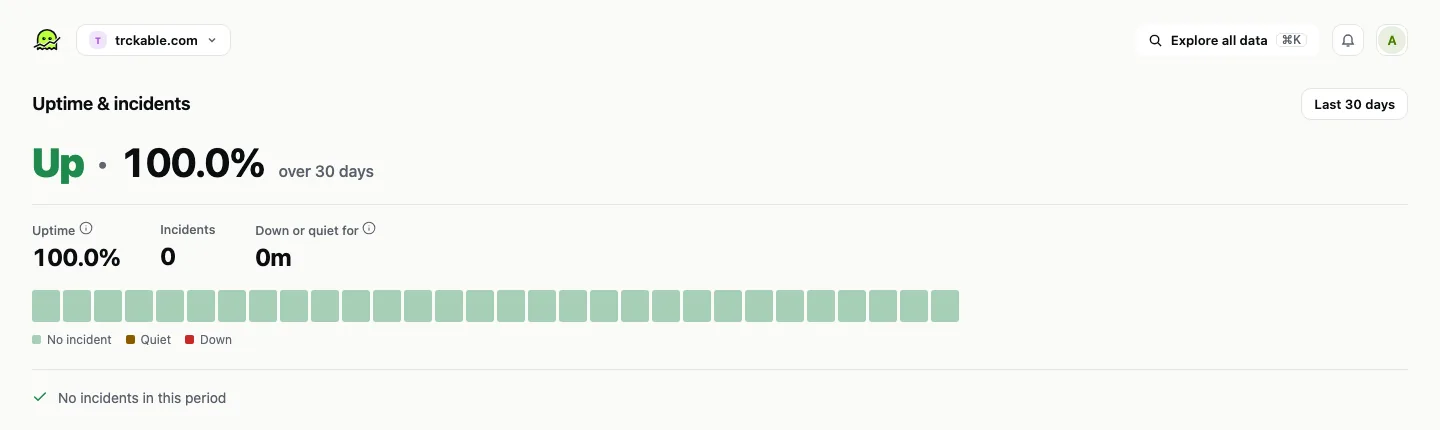
A site watched for less than an hour says "Checked for 4m, down for 3m" instead of an uptime percentage, and a site not yet watched says "Not watched yet" instead of a green tick. Uptime counts only the time a site was watched.
Open the incident
Every time a site was down or quiet is kept: when it began and ended, how long it lasted, what the checks saw, and about how many visits it cost. You can add a short note. A small mark on the chart shows where one began. Open Uptime & incidents from the badge's panel or the ⋯ menu for the figures, a day-by-day strip and the full list.
Get told once
When a site goes down, trckable mails the address that gets the Tracking stopped alert, once, with the cause. When it comes back, the incident closes and records how long it lasted. There is no mail every few minutes while it is down.
Tracking stopped is the neighbour of this check: it fires when no visits arrive for hours, which can mean a quiet night, a removed script or a site that is down. Its email says what happened ("No visits for 6 hours"), what the checks suggest, the last visit and an Open site status button. Where alerts go is in Live view and surge alerts.
When a firewall blocks the check
If your firewall answers our check with a 403, a 429 or a Cloudflare challenge page, trckable cannot tell whether the site is up. It does not call it down. Those looks do not count as failures, send no mail and do not end a real outage. The site shows Can't check, with the note that your visitors are not affected.
On a server you run yourself, TRCKABLE_UPTIME_EVERY sets how often it looks (the default is 5m, and 0 turns it off).
Try it in trckable
Open Sites and look at the Uptime card, then open Settings → Alerts and check that Tracking stopped goes where you will see it. Not on trckable yet? Install it and the checks start on their own.
The newsletter
Notes on measuring what matters.
Occasional emails from Albi: new posts, one chart worth reading, what changed in trckable.
We send one email to confirm your address, and nothing more until you confirm. Every newsletter has a link to leave. What we keep, and who sends it: privacy.