A real product is rarely one address. The landing page is example.com, the docs are docs.example.com, the app is app.example.com. You can count them as one site, so a visitor who reads the docs and then signs up is one person, or keep each on its own. Here is how each works, and how to look at one domain at a time.
Count them as one site
Use one site in trckable, with the parent domain (example.com) as its domain, and put the same snippet, with the same site id, on every host. Set data-domain to the parent domain in the script tag:
<script defer data-site="tkb_a1b2c3d4" data-domain="example.com" src="https://stats.example.com/js/tkb_a1b2c3d4.js"></script>Every visit stores the host it happened on, so history is already split by domain. The server accepts the site's own domain and any subdomain of it. Both hosts read the same trckable_vid cookie, set on example.com, so whichever the visitor opens first, the other picks it up: one visitor, one journey. The details, including a Next.js app on a subdomain, are in the docs under Landing page and app.
Good to know. Use the parent domain, not www.example.com, as the site's domain: the cookie is scoped to it, and app.example.com is not under www.
Switch between domains
When the site saw two or more hostnames in the period, a list of domains appears in the site menu, the one that opens from the site name in the header: All domains, then one row for each domain with its visitors in the period, the busiest first. The site's own name is stripped from subdomains, so docs.example.com reads as docs.
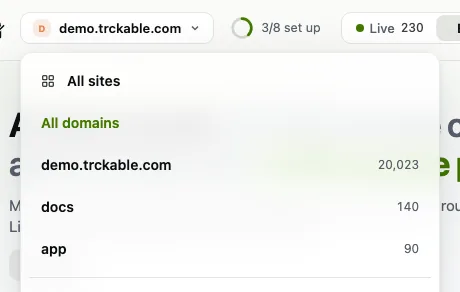
All domains is the default. Pick a domain and the whole dashboard follows: the chart and everything in Explore. Pick All domains and it clears, and a link to that view carries the choice. With more than five domains the list gets a search box. It appears only when the site saw more than one hostname.
Or keep them apart
If the docs should have their own numbers, make a second site for that host, with its own snippet. Two sites are two sets of visitors by design: a person who reads the docs and then the landing page counts once in each, and a sale is credited to whichever site carried the checkout. Choose this when different people look after each part, or when you share one dashboard and not the other.
Pick one
Count them as one when you want the path from a docs page to sign-up in one view. Keep them apart when each site has its own owner or audience. You can change your mind: the visits of a single site stay splittable by domain, so starting together costs you nothing.
Try it in trckable
Put the snippet with the same site id and data-domain on a second host, then open your dashboard and use the switch next to the site name. New here? Install trckable first.
The newsletter
Notes on measuring what matters.
Occasional emails from Albi: new posts, one chart worth reading, what changed in trckable.
We send one email to confirm your address, and nothing more until you confirm. Every newsletter has a link to leave. What we keep, and who sends it: privacy.